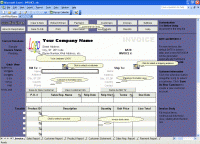
This is billing software based on Excel invoice templates. This edition is the highest edition of the billing software, supporting custom fields, unlimited number of companies and networking. Billing is easy with its WYSIWYG invoice form!
Microsoft Excel is a useful application which provides comprehensive data formatting, calculation, reporting and analysis facilities, so many people use it as an invoice creator. However, Excel is a general-purpose desktop tool, but not specialized to store, organize, and manage large amount of data.
Excel Invoice Manager combines the advantages of Excel and back-end databases, and let them do what they are best at: using an Excel template to create, calculate invoices and reports, using a back-end database to store and manage all persistent data like customers, products, invoices and payments.
The invoice template included is completely free and can be used standalone to create invoices. This means all calculation is done by the invoice template itself, and all Excel tools are available to you for customizing invoices and reports, such as customizing fonts, colors, terms, even formulas for calculating taxes. Yes, without leaving your familiar Excel, you can create very own professional looking invoices!
The Excel Invoice Manager COM add-in connects the template to back-end databases, and greatly improves the way you handle invoices. All invoice data are stored in databases, and indexed and organized for fast searching and reporting. The same is true for all customer, product and payment data.
Just within one Fill In The Blank invoice form provided by the invoice template, you can complete all tasks related to invoices, such as creating, searching, editing and removing/voiding customers, products, invoices and payments.
By simply clicking a button, the generated invoice/reports will be extracted as a standalone workbook, and you can email it out, do some formatting, or save it to other formats, such as HTML, XML, or even PDF (with appropriate add-in).
The possibilities are endless -- Thanks to your powerful Excel!
Requirements:
• Microsoft Excel/Office 2000/XP/2003/2007
Operating system:Windows 2K / XP / 2003 / Vista / Vista64 / 7 / 7 x64
Release notes:Major Update

Integrated with Microsoft Outlook. Set up phone, Email, text message, instant message, and Fax reminders directly from Outlook calendar.
Price: $0, Rating: 9, Downloads: 366
Download

AnyBizSoft PDF to PowerPoint Converter is a powerful PDF converter software which helps you easy to convert multiple PDF files at the same time to editable and dynamic PPT presentations with perfect effects.
Price: $29.95, Rating: 0, Downloads: 165
Download

Convert multipage TIFF to PDF software insert join merge combine multiple TIF to Acrobat. Batch multi frame TIF to Adobe converter tool conversion utility converting image, photo, picture, drawing, scan, snapshot and screenshot to multi-page PDFs.
Price: $14.90, Rating: 7, Downloads: 150
Download

PDF restrictions remover software unlock PDF security owner password and enables PDF content copying, document printing, form filling and modifying. Decryption tool supports 40-bits/128-bits RC4 and 128-bits AES encrypted PDF files to unrestrict.
Price: $24.95, Rating: 4, Downloads: 147
Download

PDF password security guard, protect your digital property from unauthorized person by securing them with pdf open password, preventing them from printing, text copying, filling, commenting with owner password restrictions and by encrypting.
Price: $19.95, Rating: 5, Downloads: 145
Download 
 Excel Invoice Manager Enterprise 2.23.1026